Sprint Touch Pro2 WM 6.5 ROM Officially Released
As we previously reported they would be doing, Sprint has released their WM 6.5 ROM update for the HTC Touch Pro2, which you can grab here.
Enhancements in this latest official ROM include-
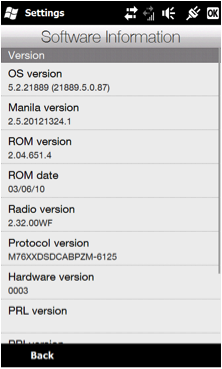
- Upgraded OS to Windows Mobile 6.5 (The OS Build is 5.2.21889, which is NOT WM 6.5.3.)
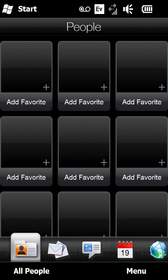
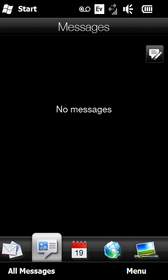
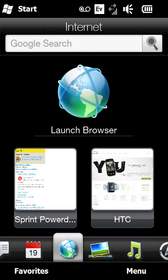
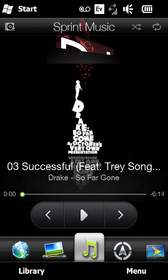
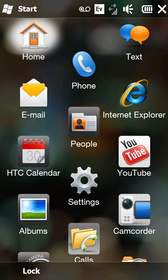
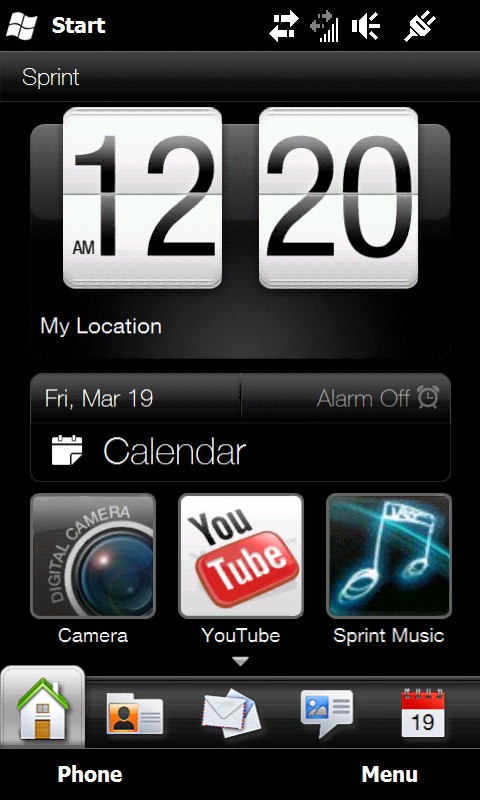
- Added HTC Sense UI enhancements (Build is 2.5.20121324.1)
- Improved Social Networking integration
- Includes a variety of minor bug fixes
- Opera Mobile is updated to 9.7.35964
- Disabled HTC Messaging and no Task Manager
The official thread on PPCGeek's discussing this can be found here, while you can download the latest Sprint OEM Driver's here if you are interested in creating your own ROM. Also, the updated Radio has been pulled and can be found here.
Credit to PPCGeek's members MetalMayhem and MarDukeMe for the images!
More Screen Shots after the break!
© 2010, BigDiesel07. All rights reserved.


tear this rom apart!
Already at it! =)
And here come all the thanks ….
You’re welcome PPCgeeks and everyone out there!
@99accordv6 –
Well thank you 99accordv6 for the heads up. =)
can the radio be used on the touch pro?
@juddrl – NO unless you want a brick!
@juddrl –
No!
Different device, and as mikee4fun stated, it will brick your phone.
good to know! Thanks.
Got it, however, sprint was surely acting as though they had no knowledge of the upgrade. Thanks PPCGeeks.
Seems as if HTC is having some trouble with there downloadable content….everytime I click on the link in this post it goes to there support website for the Touch Pro 2 (Sprint) and doesn’t list anything about the update….anyone else having this issue? I also tried it from Sprint’s website and got the same thing…I emailed HTC to see if it’s a issue on their end or if they pulled it do to some unforseen issue.
this link might work better
http://www.htc.com/us/support/touch-pro2-sprint/downloads/
@ChrisH09 – My bad, I use Google Chrome and it seems that HTC’s website doesn’t like the download site, used IE and everything is working…downloading as I type….false alarm….atleast for IE users…Google Chrome users…just use IE this one time..
@BigDiesel07 – Thats the one i was using…just doesn’t like Google Chrome….go figure…
I was reading in the thread that IE was the only browser that was actually working to download this ROM.
thanks to ppcgeeks and those whom been complainging to sprint, if not for you guys we would of never gotten this download, like they did with pro
Chrome is working fine for me…… have you installed yet?
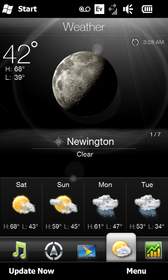
damn i wish this thing had the weather clock!
@jimmiekain – what do you mean…..
@jimmiekain – it does, it’s just now showing it on this screenshot
Why is it taking so loong to download?
thank you ppcgeeks for giving us 6.5 years ago (seems like it).
damn…Sprint going hard by adding the HD2 stuff on it….oookkkaaayyy!!!
@jimmiekain – It does, you just have to set your location…setup up the GPS crap on the phone…it works….
@orangekid @dragon1587 lol well this is gonna be crazy nice. i didnt know it had weather clock… as soon as i get home fromm work im gonna flash mine.
i’m downloading it now off of google chrome, I can’t wait!!!!!
dang stuck in a meeting. I’m glad it’s not 6.5.3! Sad they didn’t get htc messaging to work though.
Can someone extract that version of Youtube. I’m curious to see if it will work on a custom rom. There’s been problems with that app on the Sense 2.5 custom roms.
i cant wait to get home so i can upgrade!i love my pro 2!!!!!!!!!!!!!
how long did it take u guys to download it
I been downloading since 9 am… im only at 77mb/182mb………..is there any way to speed the process?
I’ve been downloading for 2 hours now and its still not close to even being halfway done
I have a quick question if your running a custom rom should we even use this upgrade at all?
o ok i thought i was trippin i been downloading forever and im only at 39%
The custom roms don’t have a working Youtube app, you have to do all kind of tweaking to get the MMS working again, custom roms don’t have the Sprint Tv and Sprint Nav tabs, and there are other bugs as well. If the stock rom runs at the same speed and memory usage, I would recommend the stock rom.
I forgot to add that some custom roms tend to have issues with the camera recording video. It records fine but when you go to play it back, a one minute video will be 5 seconds with how fast it plays back. It skips like it has a low frame rate.
For those that are downloading directly from HTC and is slow, use the download mirrors from the thread posted on this article.
will this update install like any other rom over my cooked rom?. The only thing abou this update is that my current rom has the start button on the bottom which I love.
@jawil32 – Same here it’s going to be a long day but worth the wait . . .
@locc – both mirrors?
downloading using the link from this article and only half way done. started at 9am.
I started downloading it at 8:30a finished the download at 12p, it took about 5 min to install. believe me it’s def worth the wait!!! This is by far the best WM ever!!!!
For people used to stock 6.1 Rom ….6.5 will be a little hard to get used to….It still has the start button at the top…but loses the task manager icon at the top right…but its in there trust me I’ve already used it. Overall the ROM is great…I could go without a few things that they seem to love to hard set into the ROM (Nascar, NFL, Sprint Music etc.) but I will live with it.
either mirror will work.
For the first time since the HSPL was released to the TP2 i’m using a stock rom. Its nice to have a rom with sense 2.5 on it that actually has full functionality. Could do without some of the programs though, but ill live.
im using a custom rom… can we still use the wifi router on the sprint stock rom 6.5?
@LadyNtellect –
(or allow it to be installed)
haha, you really think sprint is going to put that in there?
in that case in sticking wit my custom, or atleast until its a way to get it on stock!
mirror downloads still taking about 30 mins? or is it just me…
im not a techie and im very hesitant in downloading stuff that reconfigures my phn therefore brickin it. idk sh*t about stock rom,cooked rom etc but if itll make my tp2 better ill gv it a try
oh and 182mb needed to download sucks,bought my tp2 last week and im down to 25mb already w/o downloading a damn thing! can this update be downloaded to my memory card?!
can anyone upload to rapidhsare for faster downloads?
Mirror
Official Sprint Htc Touch Pro 2 Rom
http://www.mediafire.com/file/3hythrjywz0/HTC Touch PRO2 MR1.exe
Is Twitter in this update?
Thanks for the link cvx123!
I did not see the download on HTC website thru that first link. Where is it?
Umm ?? were did the G-sensor on/off switch go ?? Damm it that was the whole reason I bought my new tp2 . I had the Dimond and the screen flipping while driving drove me insane . My stock rom had an on/off switch on the Gsensor setting . the new Rom doesn’t ..Uggg can anyone help ???? or do I just remove this rom and go back to the stock rom?? and if the stock Rom is the answer how do I do that?
IE not displaying correctly on this new rom update. I get these huge letters to login but no logon box and search bar. I cannot type in my phone # to validate. Anybody else having this same issue?
I downloaded and installed early Saturday morning. I am very disappointed. It is very slow compaired with WM6.1. Manilla.exe is using the CPU 77%-92% of time. I have a large contact list with 2550 names and I use exchange server with 4smartphone.net. Does anyone have any suggestions to get speed back? It locks up for 1 to 3 minutes very often. I have to softrest to get it running again.
I can’t dw? i click on the download and it send me to another web side where there is not such a file.
Help anyoneo?
….sooooo theres nothing benificial here for touch pro owners…..? sad face
@TeamMike –
no way! they even removed the standard TP from the sprint site and stores.
I’m having problems with the new ROM. Text messaging is all screwed up. My new messages appear sometimes in the “messages” tab but I don’t get notified of new ones. messages get delivered at a much later time. Anyone having the same problem? overall I’m happy with the upgrade, but this is really getting me upset.
the only thing I really miss from the previous ROM is the task bar. wi-fi router still works great with this new version, and the ICS fix that I used with 6.1 also works great with 6.5. There are probably a few minor things that will need to be tweaked to make it a little faster, but I hope I can get my texting working.
@asun – Dude that’s why your supposed to download it on your PC….then install it via the USB cable that came with your phone. If you download it by your phone, install it that way, once installed…delete the file and move on…..
@lds44 –
Yes
i have a custom ROM on my tp2 and its obviously unlocked. can i still download and install this update or do i need to go back to stock 6.1 and relock the phone?
from the sound of it doesnt seem like its worth the hassle. im just waitin for the pic mail app cuz these mms bs is bogus not to mention them bite size vids i receive!
if you have a custom rom all you need to do is relock it and install this rom. no need to revert it
not sure if it the “correct” way, but I didnt relock mine. just dowloaded rom and installed it onto my phone.
Phone works great.
This rom is not worth it if you already know how to install custom roms. Ive been using energy rom and I tried this rom and I miss all the tweaks and full tethering and hacks without installing them yourself. Its good for those who have had 6.1 this whole time. Otherwise stick with custom roms. They work better and have a lot more stuff that still make it worthwhile having windows mobile.
@David737
I have the same problem… I have 650+ contacts and the large number all but paralyzes the phone when looking up contacts, or backing out of the Sense text interface.
I love this ROM. It run’s pretty damn smooth, and I’d say it’s the nicest, smoothest OEM ROM I’ve ever used.
Also, I don’t know if this is a Windows 6.5 thing or a ROM thing, but I’m pleased to say that if I receive an SMS while having an active data session going (streaming audio,tethering), I rarely get knocked down to 1X (actually I can’t think of it doing it once yet.) THANK YOU Sprint for taking your time and not f***ing it up
thanks for the rom upgrade is great i love it, but can anybody helpme finding the task manager that was on top on 6.1. thanks guys
can 6.5 be install on touch diamond ? thanks
@R2D2HC – only a custom rom can be installed on your diamond. Install this and you’ll have a Touch Diamond paperweight.
@LadyNtellect – yes i am using mine now
I was wondering (and furthermore doubting), is it possible to upgrade my Sprint Touch Pro2 to 6.5 OVER THE AIR?… as in, without using a desktop/laptop? Without access to a computer with ActiveSync or Windows Mobile Device Center, I don’t believe I can get the update. Or does somebody want to tell me otherwise? Thanks for any advice.
Until then…….
anyone know how to back up opera bookmarks and stock quotes when upgrading rom? I hate having to redo all the bookmarks and stock quotes again
@zo7 – where & how did you get your wifi working?
landscape mode sucks – text does not appear clear and crisp in senseUI mode.
other than that smoothest ROM / stable one ive ever used.
after i download it and try to run it it says that it won’t run cause of some wrong program… idk please help
How can I enable task manager?
KRID80 THANKS 4 THAT, I’M NOT A REAL PRO ON THIS BUT IT DOES’NT HURT
2 ASK. ANY SUJESTION ON DIAMOND CUSTOME ROM?
6.5 sucks major balls
thanx to this bs site of so called geeks i bricked my tp2!! makes sense y no1 comments cuz theyre full of sht.