
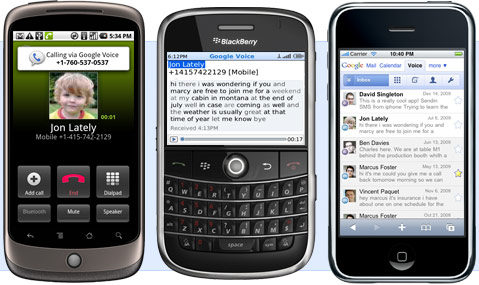
Google Voice in your Mobile Browser
Definition of workaround-
- A workaround is a bypass of a recognized problem in a system. A workaround is typically a temporary fix that implies that a genuine solution to the problem is needed. Frequently workarounds are as creative as true solutions, involving outside the box thinking in their creation.
Google has definitely engaged in a workaround of Apple's App Store as they have updated their mobile Google Voice web site to make Google Voice features accessible to iPhone, WebOS and Windows Mobile users (see below). Through a HTML5-based web app, anybody with a HTML5-capable web browser can access now Google Voice.
HTML5-capable mobile browsers include all Webkit-based mobile browsers, which includes Safari in iPhone 3.0+,the Palm WebOS browser, and the S60 web browser for Symbian as well as Chrome on Android. For Windows Mobile devices, Skyfire 1.5 (verified by myself) and presumably the Iris browser works. However, Opera Mobile 9.5 on Windows Mobile does NOT work nor does Internet Explorer Mobile (also verified by myself).
After the break is a video by Google showcasing this new-found workaround.
Source- DailyMobile.se
© 2010, BigDiesel07. All rights reserved.


were there any tricks to getting Skyfire to do this?
how about opera 10.0 beta 2u for us windows users that have gone back to stock sprint 6.1 (mr 2.01) on touch pro 1? other than *72 for call fowarding and can’t get google wave to work well on device with “sprint speed” or pc using device as wifi router………..
For Skyfire, go to m.google.com/voice in the browser.
You can select a contact or scroll down to quick call and enter a number!
I was previously using the mobile website through Internet Explorer on my phone, so now they upgraded it and -won’t- work that way?
@jpwhre – Most mobile carriers have Google Wave blocked completely. I really don’t know why. AT&T and Sprint both have it blocked from using it through mobile Wifi devices, but it works from Opera 10 beta 2. The new Google Voice also works on Opera 10 beta 2.
@banzaiwolfe – It still works. This is something different.
Some clarification: correct me if Im wrong, but working doesnt mean you get the mobile page of google voice. I have been using that for months. Working means you are getting a webapp that looks like the above video, right?
I have tried using skyfire and continue to get the mobile web page version that I get with IE and Opera.
Is there some setting I need to change so skyfire renders it differently?
I got all excited and then…I got the regular old m.google.com/voice (on skyfire 1.5 and Opera 10 beta2u). I am not excited anly longer.
I have a Touch Pro with a custom rom and I tried both Skyfire and Opera 10 Beta2u and neither worked. Can someone who has windows mobile and also on Sprint confirm that this works and maybe let us know any settings you may have.
It does work on Sprint thru Palm Pre – this I have tested
tp2 skyfire, opera9.7, getting OLD page
works fine on my opera 9.5
Works Fine with Opera Mini also!
This does not seem to work with Windows Mobile and their press release says it is for Palm Pre and iPhone.
Tried on opera 10 beta, firefox mobile beta, etc.